

This will save the active plan to the specified file name.
 Example parameter configuration
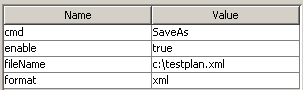
Parameter descriptions
(* = configuration required)
fileName *
Specify the file name and path for the plan to be saved.
A timestamp can be constructed by adding a date format enclosed in curly brackets. E.g. "FileName-{ddMMyyyy-HHmm}.xml" will result in: “FileName-30122013-0910.xml”
See Date Formatting for further details on the valid date formats.
format
For internal use. Don’t change.
Post your comment on this topic.